2010年11月29日星期一

How to change iPhone Wallpaper

Here are the easy steps you can take to change iPhone Wallpaper easily.

Make preparations:
Step 1: Find an image that you would like to use as wallpaper from iPhone Wallpaper.
Step 2: Right-click on a PC or control-click on an Apple computer and select "Save As" to save the image to your computer. Save it to your "My Pictures" folder or iPhoto library on a PC or Apple respectively, or wherever you prefer to store your images on your computer as long as you will be able to easily locate it.
Step 3: Connect the iPhone to your computer with the USB cable and wait for iTunes to launch itself automatically. Click on the "Photos" tab in the side panel.
Step 4: Click on the "Sync Photos From:" tab in the "Photos" menu on iTunes and locate the folder where your photos are stored. Select all of the images that you would like to transfer your to iPhone. Click on "Sync" in iTunes to transfer all of the photos to your iPhone.

Change iPhone Wallpaper
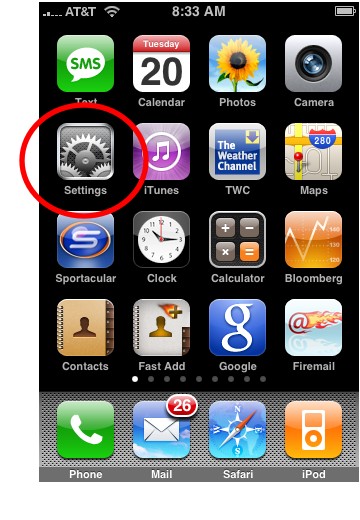
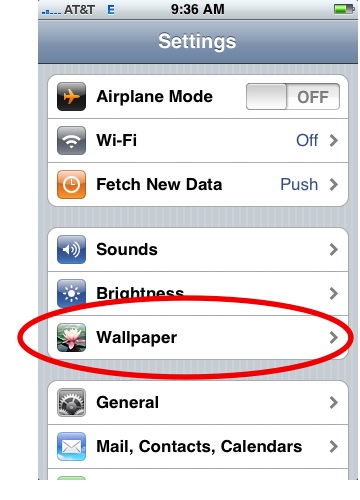
Step 1: Tap Settings on the iPhone’s home screen:

Change iPhone Wallpaper

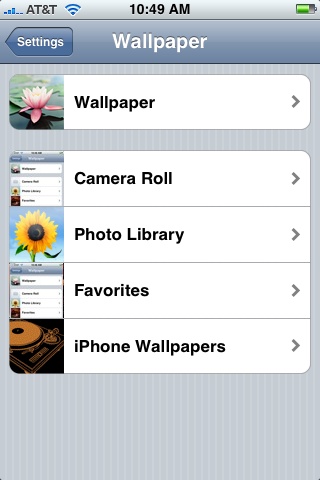
Step 2: Tap the Wallpaper tab:

Wallpaper Tab in iPhone Settings

Several tabs should appear, including one that says Wallpaper. You can tap any of the tabs to select wallpaper for the iPhone. The Wallpaper tab features a collection of pictures supplied by Apple. The other tabs feature pictures you have added to the iPhone, including those taken with the iPhone’s camera.

Wallpaper Selections

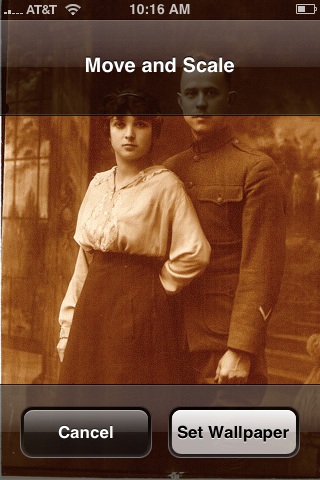
Step 3: Tap any picture. A preview screen of the wallpaper will appear, along with the words Move and Scale at the top. You can pinch and reverse pinch the picture to resize. The transparent bars at the top and bottom simulate the bars for the clock and Slide to unlock that will eventually display on top of your wallpaper.
In the example below you can see that the heads of the two peoples will be partially covered by the top bar:

Resize iPhone Wallpaper

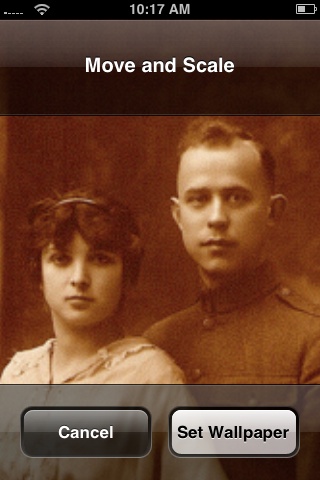
To fix, I will reverse pinch to expand the picture, then drag the picture so that their faces appear in the center:

Resize iPhone Wallpaper
Step 4:
Tap Set Wallpaper to finish.
To view your new iPhone wallpaper, put the iPhone to sleep by pressing the sleep button on the top of the iPhone. Then hit the home button to wake the iPhone, and you should see the wallpaper.
Note the position of the clock and Slide to unlock transparent bars. If you’re unhappy with the position of the wallpaper, repeat the steps above.

2010年11月28日星期日

How to upload videos to YouTube easily and quickly on Mac

Google has released basic software called Vidnik which is the quickest, simplest way to make movies using the built - in camera on your Macintosh and upload those movies to your YouTube account. You must first sign up for a free YouTube membership to upload videos. You can use Vidnik to create a video diary, or just to quickly record a video comment to attach to an existing YouTube video. Vidnik works with the built-in video cameras on recent Macs, with Firewire video cameras, and with many USB video cameras.

Part 1, use Vidnik to Record video segments using your iSight camera and upload them to YouTube.

upload video to YouTube

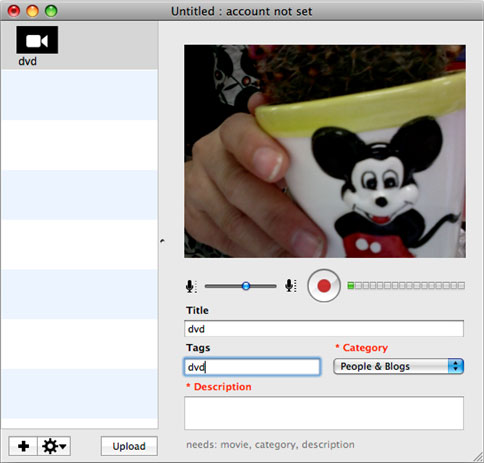
To use Vidnik, run the app, then click the record button to start recording. Click it again to stop. Trim to just the golden moments you want to keep, as in the screen shot above. Fill in the required title, description, and so on. Click the upload button. That's it.

Part 2, Use Vidnik to upload videos to youtube
You can drag movies made in other programs onto Vidnik's column of movies, and then click the upload button. And to use another program to do a little post-production, use the Gear menu to show Vidnik's movie file in the Finder. Edit the movie in the other program, and then upload it.Vidnik can only support videos such as: 3GP, AVI, DAT, MOV, MP4, M4A, WAV, AAC. It does not support ASF, FLV, MPEG, RM, WMV, MP3, AC3.
You can use the video converter for Mac to convert your videos to the formats that Vidnik can run.
If you want to upload DVD to TouTube, you need to use DVD ripper to rip DVD to video formats supported by YouTube first. If you are Mac user, you can use this DVD ripper for Mac .

upload DVD to YouTube

2010年11月25日星期四

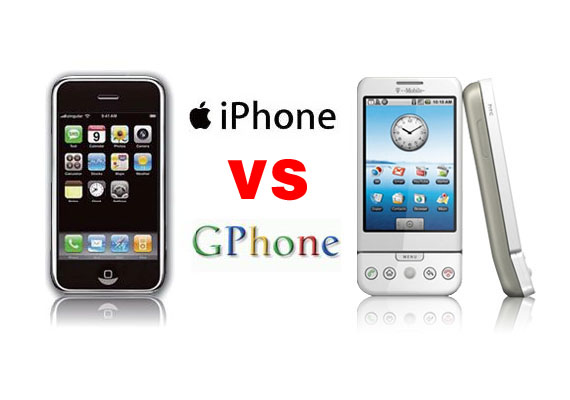
Gphone vs iPhone, which is better?

As iPhone is the most talked about smart phone on the planet and it has won millions of hearts of users by his multi-touch screen and other powerful/beautiful design. Of course, iPhone has brought so much money for Apple.
On 23rd, Sep 2008 Google released G1 and claimed that they will have a share of the big market of smart phone.
So, which is better about iPhone and G1? That maybe asked by many people who want to buy a new phone. Here I will give some of opinion about G1 and iPhone.
I will compare these two phones in three aspects, hardware, software, and their performance as a media player.

Gphone vs iPhone

Part 1: Hardware.

1. The price and storage memory
First, the price and storage memory is what I concern most, for iPhone $199 8GB, $299 16GB, for G1 $179 1GB. When you see this you will say G1 is $20 lower than iPhone but G1 is only 1GB and you will pay another $40 for an 8GB SD Card. So I think iPhone win in this round.

2. Appearance
iPhone is 133 grams/4.7 ounces and G1 is 158 grams/5.57 ounces. G1 is taller while iPhone is thinner (G1: 117.7*55.7*17.1, iPhone: 115.5*62.1*12.3).

3. Mobile Network
For mobile Network, they both have Quad Band GSM/EDGE UMTS, but G1 uses T-Mobile-only US 3G and iPhone uses AT&T-only US 3G.

4. Touch screen and input
About touch screen display, iPhone has Multi-touch 3.5 480*320 163 ppi, but G1 does not support mulit-touch. And in input aspect, G1 uses keyboard, Trackball, 6 buttons and touch screen, while iPhone has home button and multi touch screen.

5. Expansion
In expansion ports, G1 uses SD, ExtUSB(USB+audio) but iPhone has headphone, Dock connector (USB+ audio, video, remote). They have the same wireless WiFi 820.11b/g Limited Bluetooth 2.0 EDR.

6. Others
About hardware, the two phones perform almost the same and the only big difference is the iPhone uses multi-touch screen and G1’s camera is better than iPhone. And iPhone has a 1400Ah battery with 300 hours standby time but G1 only has a 1150Ah battery with 5 hours talk time and 130 standby.

Part 2: Software.

iPhone and G1 are both using Webkit as their browser engine. In media playback aspect, iPhone supports music, audiobook, video, streaming, downloads and rental, while for G1, only music playback. G1 has Android Market as its third party software store while iPhone has iPhone app store. G1’s platform is Modified Java development and iPhone uses Cocoa Touch.

Part 3: Their performance as media player.

G1 supports H.264, 3GPP, MPEG4, Codec 3GP video and MP3、AAC、AAC+、WMA、MPEG4、WAV、MIDI、REAL、AUDIO、OGG audio formats.
iPhone supports AAC,Protected AAC,MP3,MP3 VBR,Audible (formats 1, 2, 3), Apple Lossless, AIFF, WAV audio formats and H.264 (up to 1.5Mbps), MPEG-4 (up to 2.5Mbps) 640*480, 30fps, AAC-LC (up to 160 Kbps), 48kHz dimensional sound .m4v, .mp4 and .mov format.

Amazon MP3 Store allows you to download 6 million songs without the DRM protection, 89 cents per song. It is similar with the Apple iPhone, you need to pay for the video and audio sources on the Apple store. But how to get free sources for your G1.

For iPhone and G1 you can buy songs and videos from store, which is really expensive, and you can also make songs and videos for your iPhone and G1 by yourself, you just need to convert your DVDs and videos to mp4 format and then you can put them easily to your iPhone and G1.

Here I recommend you Aiseesoft DVD Converter Suite, it includes Best DVD Ripper, Total Video Converter and iPod to Computer Transfer.
For Mac user, I recommend you Aiseesoft DVD Converter Suite for Mac, it includes DVD Ripper for Mac and Total Video Converter for Mac.

2010年11月24日星期三

Obama Signs a Euro-iPad (Hey, It’s Almost Thanksgiving!)

Here is a funny video sent to us of President Barack Obama, while at the Lisbon summit this past week, signing an Apple iPad using a touchscreen software program.

“I’ve done this once before,” he said, as he signed the tablet like a pro. And, indeed, Obama had put his John Hancock on one in Seattle just a month ago.

Despite all the unrealized hope for some more progress in the digital arena by his administration, I guess he is the Internet President.

Apple Ramps Up Holiday iPad Production

Apple manufacturing partner Foxconn is ramping up iPad production capacity to meet demand for the tablet over the holiday season. Taiwanese trade mag Digitimes claims Foxconn has begun using its newest factories in Chengdu, China, to manufacture an additional 10,000 iPads per day, or about 300,000 iPads per month.

Not a huge number, but together with the 2.5 million units Foxconn’s main production site at Shenzhen can produce each month, it’s presumably enough to offset the inevitable spike in holiday demand. And once Chengdu’s 50 iPad production lines are up and running in 2011, Foxconn will be able to produce about 40 million iPads per year–according to Digitimes, anyway.

2010年11月22日星期一

New HP CEO Gets to Witness a Q4 Beat

If newly installed HP CEO Léo Apotheker was looking for something to distract investors from his role in the Oracle-SAP legal tussle, he couldn’t have hoped for better than his company’s latest financials.

Posting fourth quarter earnings after market close today, HP reported per-share earnings of $1.33 on revenue of $33.3 billion.

The Street had been looking for $1.27 on revenue of $32.7 billion.

“HP proved once again that it is able to execute given its market strengths and technology leadership,” Apotheker said in an earnings release. “I have seen firsthand that we have talented people who are focused on delivering value for our customers. Our market opportunity is vast, and I am confident that we will extend our leadership into the future.”

For the current quarter, HP says it expects revenue of roughly $32.8 billion to $33 billion, and earnings-per-share of $1.28 a share to $1.30 a share. The company’s shares are trading up about 1 percent after hours.

Discussing HP’s performance during an earnings call Monday afternoon, Apotheker didn’t have much to say about his plans for the company’s strategic direction. Evidently, he still needs time to process all the information gathered during the “listening tour” with which he began his tenure as CEO (and escaped testifying at the Oracle-SAP trial). “It’s a bit early for me to discussoverall strategy,” he said. “I need to spend more time digging into our technology and meeting with customers and employees.” That said, he did seem confident that HP will continue to do well into 2011. “It is clear that we are winning in the market,” he said. “We have strong momentum going into next year.”

New iPod touch 2G Guide

A big surprise turn up at 9th Sep for all iPod fans – the new iPod touch 2G and Nano 4G released. It’s really lucky and exciting to get a new iPod Touch 2G. And in order to help iPod users to learn more about it, I collected some information for this new iPod touch 2G guide. And it also includes how to enjoy the multimedia on you new iPod touch 2G such as download free video to iPod, convert DVD to iPod and transfer music video from iPod to iPod and iPod to computer.

Price:
As expected, the biggest news with Apple's second-generation iPod Touch is its drastically reduced price. The 8GB version of the iPod Touch 2G is now $229 (down from $299), the 16GB is $299 (down from $399), and the 32GB is $399 (down from $499).

Size:
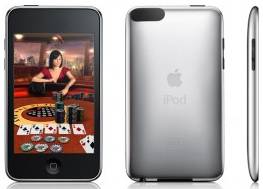
The new iPod touch 2G is smaller and lighter than the original, 3.5 inch touch-screen, measuring 4.1 by 2.4 by 0.33 inches and weighing 4.05 ounces. With its rounded edges, flush display and curved, more compact design, the iPod touch 2G is promised to be more comfortable to hold and more portable than ever.

New iPod Touch - size

Game:
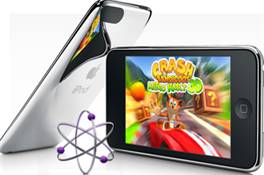
iPod touch 2G users can choose from hundreds of gaming titles such as "Spore Origins" and "Scrabble" from Electronic Arts, and "Real Football 2009" from Gameloft available on iTunes or directly through the App Store application on the iPod touch. The App Store works over Wi-Fi, enabling users to browse, purchase and wirelessly download applications.

New iPod Touch - game

Battery and “Genius”
The new iPod touch 2G promises up to 36 hours of music playback or six hours of video playback on a single charge. It also works with the new iTunes 8 Genius feature, allowing users to automatically create playlists while on the go. These playlists can also be synchronized with iTunes 8 servers.

Others features in new iPod touch 2G
Build-in accelerometer for casual listening; more convenient volume control button on the edge; the newest improvements “Nike+iPod” which can help you track your workouts by slipping a Nike+iPod sensor into you Nike+ shoes.

Then, Let’s talk about how to enjoy multimedia on your New iPod touch 2G
Part 1: How to free download video to your new iPod Touch 2G.
I always download free video and music from Youtube and limewire.
Youtube streaming videos are all FLV formats, so you need to play the video with a flash player programe on your computer, and if you want to put them on your new iPod touch 2G, use a iPod video Converter to convert FLV to MP4 format.
I got this totally free Youtube downloader, just enjoy.
http://www.aiseesoft.com/free-youtube-downloader.html

Limewire is a fast and popular freeware working on Windows, Linux and Mac OS. Through the P2P (peer-to-peer) network, you can free download various video and audio files by keywords searching. Most of its video formats is MPEG, so convert them and transfer to your iTunes then iPod touch 2G.
http://www.limewire.com/

Part 2: How to convert DVD to iPod Touch 2G
The new iPod touch 2G can only play MP4 and H.264 video, but DVD movie is MEPG, MPEG-2 video and CSS protected, so you need an application to convert DVD to MP4 video, then sync it to iPod touch 2G via iTunes.

convert DVD to New iPod Touch

To complete Part 1 and Part 2 I recommend you an iPod studio pack which includes a DVD to iPod converter and video to iPod converter.
You can get familiar with the apps by using this detailed step by step guide:
http://www.aiseesoft.com/article/download-dvd-pdf-youtube-videoto-ipod.html

Part 3: How to convert files back to your computer and transfer between iPod
Because iTunes prevents you from copying music or video from the iPod touch 2G back to computer, so you need a special tool to do that.
Yamipod, Aiseesoft iPod to Computer Transfer, Sharepod, iDump
And then re-add it to your iTunes library and sync it to other iPod touch 2G.

Free Trial: Free download Aiseesoft DVD to iPod Suite

view the datail of ipod nano chromatic/touch 2 converter

2010年11月20日星期六

Downgrade PSP to version1.5 using PSP battery

Lots of users downgrade their PSP to version 1.5 because they can upgrade their PSP to any version from 1.5. And if you upgrade your PSP to version 3.51, you can play any downloaded games and run any applications. Do you know that you can downgrade your PSP system to version 1.5 all by yourself by turning your PSP battery into a pandora's battery? All you need are an original PSP battery (with more than 50% charge) and a Memory Stick Pro Duo with 1GB memory or above.

I. Get ready (Reformat PSP memory stick)
Before you get started with the downgrade, you need to reformat your PSP memory stick. If you don't know how to reformat it, you can refer to the steps below:
1. Press the HOME button on the bottom left of your PSP.
2. Use the arrow keys to move to the Settings area, then move the up and down keys to go to System Settings.
3. Push the "X" button (or the "O" button, depending on which button is the "Enter" button of your PSP) and scroll to find the "Format Memory Stick" option. Push the "X" button again to select this option.
4. Your PSP will now confirm that you want to reformat the memory stick, choose yes and your PSP will be physically formatted in a few seconds.
To do the downgrade, you also need to download an application pack. After the downloading is finished, what you get will be a compressed application pack named "pandora", decompress it to the root directory of a hard disc, say Disc H. In this "pandora" folder, you can see four folders including mspformat, msinst, battery and installer, and a file named UPDATE.PBP.
Now you are ALL ready to turn your PSP battery to a Pandora's battery and use it to downgrade any PSP!
II.Turn your PSP battery into a padora's battery
Step 1: Logically reformat your PSP Connect your PSP to your computer. And your PSP will be recognized as a new hard disc, say K. Then click Start -> Run, input cmd in the popped up dialog box, and click OK to enter DOS system. Use the below commands one by one to run the mspformat file: Input "H:", and press the "Enter" Key on your keyboard. (Here H is the disc where the "panndora" folder is located) Input "cd pandora" and press the "Enter" Key on your keyboard. Input "cd mspformat" and press the "Enter" Key on your keyboard. Then input "mspformat.exe K" and press the "Enter" Key on your keyboard. (Here K is the name of the disc that your PSP is recognized on your computer.) After these commands, your PSP will be logically reformatted in a minute.

 PSP downgrader - Downgrade PSP

Step 2: Open the recognized PSP hard disc on your computer, create a new folder and name it "PSP", open this "PSP" folder, create a new folder and name it "game". Copy and paste the "installer" folder and the "battery" folder into the "game" folder. Then copy and paste the UPDATE.PBP file to the root directory of the PSP hard disc on your computer.
Step 3: On your PSP, switch to the Game option, press X or O (depending on which is the "Enter" key of your PSP). Go to "installer" and press X or O to run it.

PSP downgrader - installer

In a few seconds, a file named "msipl.bin" will be created on the root directory of your PSP memory disc. And now, you should take out your memory disc and then put it back in, which seems to be useless but is a very necessary step.
Step 4: Connect to your PSP back to your computer. Then enter DOS system as mentioned in Step 1. Use the below commands one by one to run the mspformat file:
Input "H:", and press the "Enter" Key on your keyboard
Input "cd pandora" and press the "Enter" Key on your keyboard.
Input "cd minst" and press the "Enter" Key on your keyboard.
Then input "msinst.exe K K:\msipl.bin " and press the "Enter" Key on your keyboard. (Here K is the name of the disc that your PSP is recognized on your computer.)
When you see a popped up message asking if you are sure, click "Yes".
Step 5: Go back to your PSP, switch to the Game option, press X or O (depending on which is the "Enter" key of your PSP). Go to "battery" and press X or O to run it, press X or O to OK every popped up message to finish running the battery application.

PSP downgrader - battery

Now, your pandora's battery has been created!

III. Use the created pandora's battery to downgrade your PSP
After you turn your batter to a PSP downgrade battery (pandora's battery), you can use it to downgrade your PSP by following the instructions below:
Take out your PSP Memory Stick and battery, then put back in your PSP Memory Stick first, and put your battery back in.Turn your PSP power on, when you see three options; select the Downgrade option, your PSP will be downgraded in a very short time and it will be automatically shut down afterwards.Turn your PSP on again, and you will see a blue screen. But no worries, you can just press the O key, and your PSP system is already version 1.5!
Note: The above process will turn your PSP battery to a pandora's battery that can be used for PSP downgrade. But the pandora's battery cannot be used to play PSP games, videos or music. And the process is not reversible. You will need to get an additional PSP battery for regular uses. However, you can use your pandora's battery to downgrade any PSP to version 1.5 or even repair you PSP.

Recommended Products For you:
DVD to PSP Converter for Windows
Aiseesoft DVD to PSP Converter for Windows is a professional application that is designed to convert DVD movie to PSP on PC.

PSP Movie Converter for Windows
Aiseesoft PSP Movie Converter is a professional video to PSP converter for Windows that can convert all sorts of video formats to PSP video on PC.

2010年11月18日星期四

How to compress DVD-9 to DVD-5 for Mac

We often use DVD to store video and data file. Varieties of DVDs are sorted by the way data stored.

DVD-9 holds 8.5GB and is supported by the DVD+R and DVD-R formats. It is also known as Single-Sided Double Layer (sometimes called Dual Layer). The official names are DVD-R DL and DVD+R DL.

DVD-5 holds 4.7GB and is supported by the DVD+R/RW and DVD-R/RW formats. It is also known as Single-Sided Single Layer.

If you want to compress Double Layer DVD-9 to Single Layer DVD-5 on Mac, you must use one Mac DVD Copy software. Download this Mac DVD Copy to have a try;

Buy NowFree trial(Intel PPC)

How to compress DVD-9 to DVD-5 for Mac

Insert your DVD and select the copy DVD mode

Select souce: Choose DVD-video disc from the source pop up menu.

Select target: From the “Target” pop up menu, select the DVD disc, and on the type of DVD disc, please select the disc type “D5(4.7GB)”(there are three types of DVD discs: D5(4.7GB) Disc, D9(8.5GB) Disc and customized disc.)

Start to compress DVD:Click “Start Copy” button to begin your DVD compressing.

learn more on: how to edit DVD file with DVD Copy for Mac.

2010年11月16日星期二

Shopkick Checks In With Target–CEO Cyriac Roeding Talks About Social Shopping

The idea of being rewarded for being a consumer is getting a lot of heat of late, as retailers seek to take advantage of the fast-moving social phenom among consumers, especially young ones.

Thus, a wide range of efforts to combine location-based mobile apps with purchasing, both online and offline.

Earlier this week, BoomTown posted on a funding for one such start-up, Topguest, which links check-ins with airline and hotel loyalty programs.

Today, another company in the space, shopkick, announced it had added another store–Minneapolis-based Target–to its list of retailers deploying its platform and mobile app.

As with customers of Macy’s, Best Buy and others, users of the shopkick app will receive points and other rewards, as well as instant mobile coupons, just for walking in the store.

The point being: Retailers need to reward foot traffic and not just purchases.

The Target partnership is limited now to 242 stores in the Chicago, Dallas, Los Angeles, Miami, Minneapolis, New York City and the San Francisco area.

Target will also offer scannable mobile coupons to customers for redemption at checkout.

It will be interesting to see how effective apps such as shopkick are as they roll out, as consumers test them.

Unlike others that offer quick deals–from Foursquare to Facebook to, now, Yahoo–shopkick uses its “kickbucks” as an enticement simply for being present in a store or scanning certain barcodes.

It’s certainly easy enough–my son, Louie, did it with ease and definite enjoyment–although a user does need to remember to fire up the app when entering a participating store.

There is also a small device retailers need to install need to make the shopkick ecosystem work.

CEO Cyriac Roeding, a former EVP for CBS’ mobile unit, created the concept for the Menlo Park, Calif.-based start-up while an entrepreneur-in-residence at Kleiner Perkins.

The company has raised $20 million in venture funding from Kleiner’s iFund, longtime Silicon Valley investor Reid Hoffman, as well as Hoffman’s home at Greylock Partners.

2010年11月15日星期一

A 4.3 Million Mac Quarter for Apple?

Apple is headed toward another record-breaking quarter for Mac sales. That’s the indication from the latest NPD retail data, anyway. Piper Jaffray analyst Gene Munster looked over NPD’s numbers for the first month of the September quarter and figures Apple is on pace to sell between 4.1 million and 4.3 million Macs during the holiday shopping binge–which is in line with Wall Street expectations of 4.2 million.

“This early data, along with our assumptions for international Mac sales, which are growing faster than domestic Mac sales, and the final 2 months of the quarter, implies (year over year) Mac unit growth of 22%-28%, in line with the Street at about 24% y/y growth,” Munster wrote, adding Apple may see an additional bump thanks to the new MacBook Air. “We note that the all new 11″ MacBook Air launched on 10/20 alongside a redesigned 13″ model, and we believe the first full month of new MacBook Airs (Nov.) could also drive unit growth in the quarter.”

Path: The Social App That’s Not Viral (By Design)

Silicon Valley is in the midst of a mini photo-sharing app boomlet. We have Instagram (which started adding 100,000 users per week as soon as it launched last month), Picplz (which beat out Instagram to get a Series A round with their shared investors, Andreessen Horowitz) and as of tonight Path, from former Facebook exec Dave Morin.

Dave Morin

All three companies make mobile apps (primarily on the iPhone) that allow users to take and immediately share images with friends. It seems kind of simple and mundane, but all these smart people seem to think photo-sharing is the future.

Morin and Path are the most convincing about there being a larger idea behind what they’re doing. San Francisco-based Path is stubbornly focused on close personal connections — aka real friends.

Unlike every other social site, where there’s an implicit pressure to collect as many friends and followers as you can (and at the same time increase the site’s user numbers), Path is only for the people you really know and trust.

In order to force and foster that kind of sharing, Morin’s team has left out many of the social web features we’re used to. Users can do only two things on Path: share photos and view them.

There are no reciprocal friend relationships, no likes or comments, no fun photo-editing filters, no publishing photos to services like Facebook and Flickr, no editing something after you post, and no global user search (you have to know the email or phone number for anyone you want to add).

And there are additional restrictions. Users can only ever share with a maximum of 50 people (though they can follow more than 50 people, if invited). Every single post has its own privacy settings — you can share either with only the people tagged in it, or only your share list. If you get sick of someone who’s sharing with you, you can “pause” them until further notice. Users who don’t have iPhones can view photos on the web.

The most interesting feature for me is that users see which of their contacts have viewed any one photo. So on Path, you can’t lurk in peace. People know when you’ve seen their posts. This might be a little creepy, but it also could cut down on those annoying awkward conversations that sometimes happen when you’ve seen someone post about something online and then they start telling you about in person.

Photos are tagged with the location they’re taken automatically, and users can add people and tags. If someone else takes a picture at that same location, tags that have been previously used near that place recently will be at the top of the list.

The idea is those tags will be used to help users relive their memories stored on the service. So for instance someone Morin shares with could retrace his “path” of wine tasting in Napa by zooming in on a map of the pictures he posted from California wine country.

But the thing is, if you want to go try Path (which you’ll be able to do in the U.S. and Canada as of 9 p.m. PT tonight by going to Apple’s App Store, and in the rest of the world within a few hours), it’s going to seem rather empty at first. You’ll have to seek out friends to share with from scratch — but even worse, nobody will be sharing with you until they decide to add you.

Unlike just about every other social service, Path is not really viral. At all. So even though it’s interesting, its numbers are highly unlikely to correspond favorably to competitors like Instagram. And after all, how many mobile photo-sharing apps are you really going to use?

“We really prioritize slow organic growth over hyper-viral growth and going after influencers to build this really steep graph,” said Morin, who formerly helped lead Facebook Platform and Facebook Connect before leaving the company in January. “We are building Path to be a 30-year brand.”

He added, “Many of the photo-sharing apps are photo-blogging apps and popularity contests. On Path, you should always feel comfortable being yourself.”

This anti-viral stuff almost seems like overkill, but Morin grounds Path’s feature decisions in the theories of the evolutionary anthropologist Robin Dunbar (known for the oft-cited “Dunbar’s Number” of 150 acquaintances, he also proposes that 40-60 people is the outer bound of our personal networks) and Nobel prize-winning psychologist Daniel Kahneman (who talked about the difference between experience and memory in a well-received TED Talk on happiness).

If this hyper-personal stuff works, I think Path could potentially create a third major category of social network, distinct from the kind of relationships found on the two current giants Facebook and Twitter. But let’s not get too far ahead of ourselves — and c’mon Dave, you should really let people comment on and like their friends’ photos.

Path was co-founded by Morin, Shawn Fanning and Dustin Mierau, both formerly of Napster. The staff also includes Mallory Paine, who helped engineer the iPhone photo and camera apps for Apple, and Matt Van Horn, who formerly did business development at Digg. Fanning is chairman and landlord to the company but is working on his own other projects day-to-day.

Path has already raised a jumbo seed round with Index Ventures, First Round Capital, Founders Fund and Betaworks. The company also provided us with an extensive list of individual angel investors: Ron Conway, Kevin Rose, Ashton Kutcher, Keith Rabois, Dustin Moskovitz, Marc Benioff, Gary Vaynerchuk, Steve Anderson, Tim Draper, Joi Ito, Fadi Ghandour, Matt Cohler, Sam Lessin, Bill Randuchel, Karl Jacob, Paul Buchheit, Ruchi Sanghvi, John Couch, Michael Parekh, Claudio Chiuchiarelli, Maurice Werdegar, Don Dodge, and Chris Kelly.
2010年11月13日星期六

How to sync and put cusomized ringtone on iPhone

Previous part: How to convert DVD, Movie, Music to iPhone ringtone and put ringtone on iPhone/iPhone 3G?

There are also some other ways to convert audio to iPhone ringtone and sync it to iPhone with iTunes, but I think these are a little complicated and users may be at a loss with such ways.

Here I recommend iPhone PC Suite, an almighty iPhone manager that can let you manage phone book, software, media and other files between iPhone and computer without iTunes easily.

But before using this tool, make sure your iTunes installed and has been connected with iPhone once before (Then you will never need not run iTunes when you use iPhone PC Suite to manage your iPhone).And when the first time you connecting iPhone, it will install PhoneDaemon on your iPhone, don’t worry it is green software and will do nothing harm.

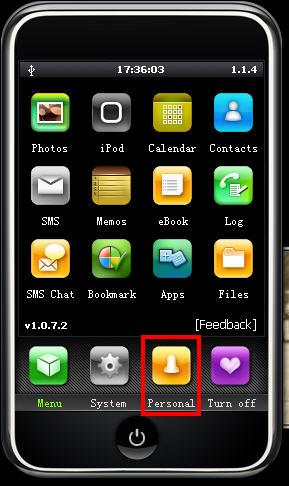
Now I will show you how to sync the converted iPhone ringtone to iPhone without iTunes. Connect you iPhone to computer, double click” iPhone PC Suite” to start iPhone PC Suite, the program will scan you iPhone automatically for a short while. Then click button “Personal” on the main menu, select ”ringtone”.

put ringtong on iPhone

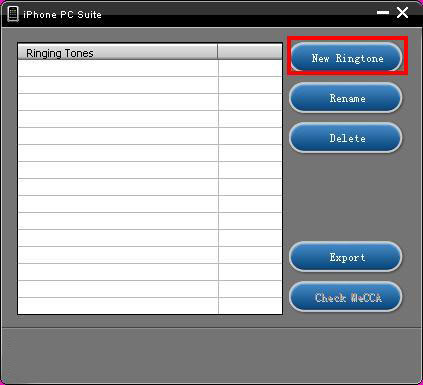
Click “New Ringtone” to locate the converted iPhone ringtone.put ringtong on iPhone

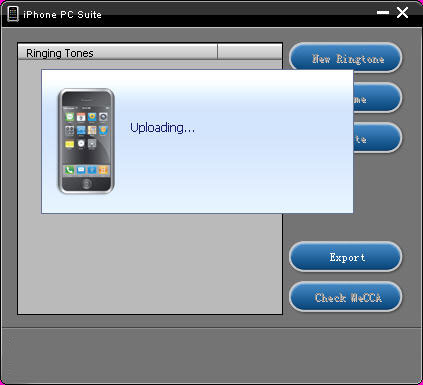
Select your target iPhone ringtone, then it will upload the ringtone to iPhone automatically.

put ringtong on iPhone - ringtong loading

Then you can select your favorite audio file and set it as your iPhone ringtone on iPhone. Click “setting”->”Sound”->”Ringtone”, the converted ringtone is listed on column “Customize”. Now you can enjoy the fun of your unique iPhone ringtone!
This free iPhone PC Suite also has other powerful functions, we will share them later.

Previous part: How to convert DVD, Movie, Music to iPhone ringtone and put ringtone on iPhone?

2010年11月11日星期四

MKV file, MLV player, Free MKV Converter and MKV Burner on Mac OS

What is MKV file?
.MKV is a container format developed by Matroska. Matroska file types are .MKV for video (with subtitles and audio), .MKA for audio-only files and .MKS for subtitles only. The most common use of .MKV files is to store HD video files.It can hold different types of video and audio. For example, there might be an .avi file contained within the .MKV file. High Definition movies in 720 or 1080 pixel width format are often encoded and packaged as a Matroska format video with a .MKV file extension.

How to play MKV file s on Mac?
I recommend trying either MPlayer OS X or VLC Media Player. They are all free.
These excellent and free multimedia players can tackle many of the video formats unknown to QuickTime. They contain a decoder to decode the .MKV files. They will also play many of the formats you will find inside the .MKV file.
How to convert MKV to DVD, MP4, AVI, etc on Mac for free?
I recommend VisualHub to convert MKV to MP4, AVI, etc on Mac. It can convert MKV to iPod Nano, convert MKV to iPod Classic, convert MKV to iPod touch , convert MKV to iPhone, convert MKV to Apple TV, convert MKV to Xbox 360, convert MKV to PSP, convert MKV to PS3, AVI, convert MKV to MP4, convert MKV to MPEG, convert MKV to Flash, convert MKV to WMV and convert MKV to DVD.
Techspanion (The developer of VisualHub) has closed shop and after an outcry from fans, VisualHub, the popular video converter on Mac OS X have now gone open source. It has got new name Film Redux. You can download its open source and built it by yourself. Here is a tutorial: How to build iSquint and VisualHub?

Convert MKV on Mac

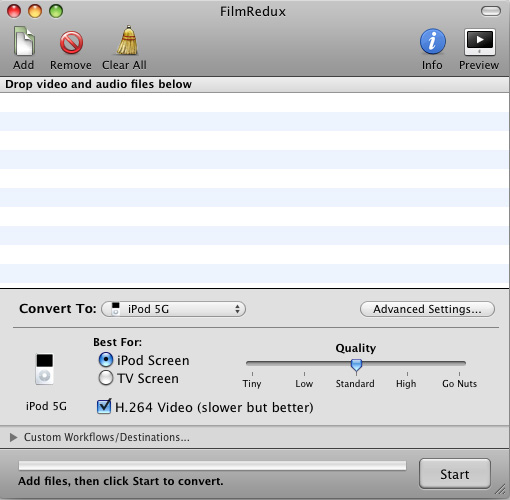
Step 1, Run Film Redux (VisualHub)
Step2, Load MKV videos
Insert your MKV files from your Mac .Click the Add files button to load your MKV videos.
Step3, Convert MKV to MP4, AVI, iPod, etc.
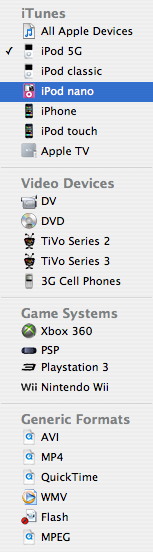
Here is the list of the formats that VisualHub can convert MKV
They are iPod Nano, iPod Classic, iPod touch , iPhone, Apple TV, Xbox 360, PSP, PS3, AVI, MP4, Quicktime, MPEG, Flash, WMV. Choose the format you want to convert MKV to and click Start.

VisualHub - convert MKV list

That’s all. Now, we have converted MKV to iPod Nano, iPod Classic, iPod touch , iPhone, Apple TV, Xbox 360, PSP, PS3, AVI, MP4, Quicktime, MPEG, Flash, WMV.
How to convert DVD to MKV on Mac for free?
I recommend you use Handbrake to you to convert DVD to MKV on Mac . HandBrake is an open-source, GPL-licensed, multiplatform, multithreaded DVD to MPEG-4 converter. It can convert DVD to MKV on Mac eaisly and for free.
Step 1, Download and Install Handbake
Download the free program Handbrake. Check to see if your Mac has the system requirements; click on the apple icon in the top left corner and About this Mac. Then install HandBrake.

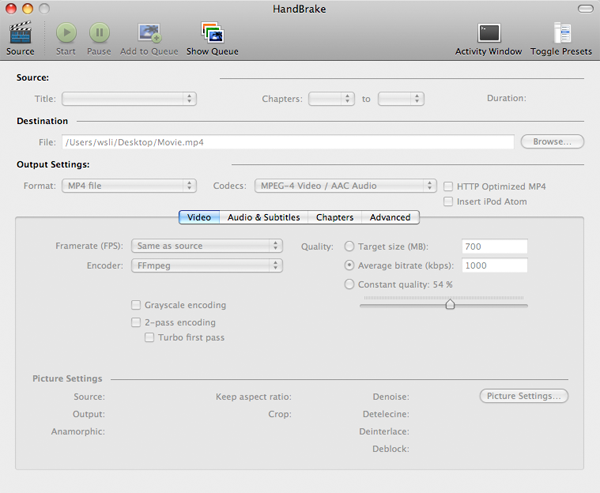
Handbrake - convert DVD to MKV

Step 2, Run it and insert DVD.
Select your favorite DVD disk and put it in the disk drive. Then run HandBrake and click Detected Volume to choose source. Click Open and you will be able to see many titles included in this DVD disk. Choose the longest title if this is a movie DVD, or choose your favorite chapter if this is an episode.
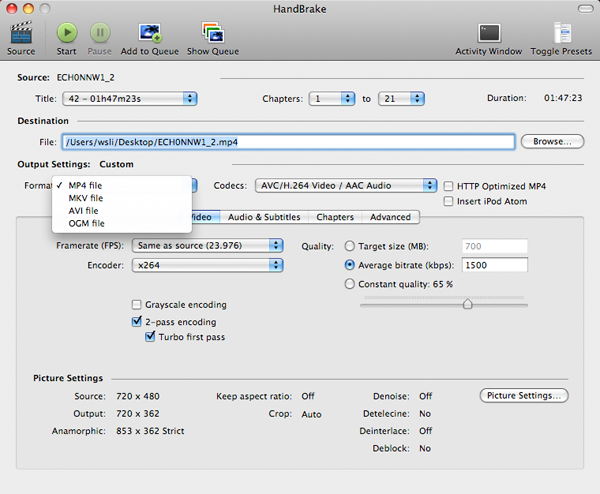
Step 3, Select Output setting
Select MKV files as output format and select other settings such as video quality, audio track, Audio Sample Rate, bitrate, Picture Settings, etc. Handbrake - select output setting

Step 4, Rip DVD to MKV on Mac
Check all settings and click Rip. A progress bar will show its ripping speed; depends on many factors like speed of Mac, filesize, etc.
That’s all. We have converted DVD to MKV for free now.
Note: Handbrake can not rip encrypted DVD movies. If you want to rip encrypted DVD movies, you can use this DVD Ripper for Mac. You can also use Mac the ripper which is free.

2010年11月9日星期二

Put Limewire music, YouTube video on iPod

1. Put music and videos from Limewire to iPod
Limewire is a download tool I assume lot of us use. I often use it to download free music and videos and put them on my iPod. I also often visit Youtube to watch videos and sometimes I download videos from Youtube to put on my iPod.
Search and download songs from Limewire. You may get songs in all sorts of formats, but not all formats are supported by iPod. Usually I select three formats: MP3, AAC and M4A formats that are supported by iPod and can be directly transferred to iPod using iTunes. For the detailed specs info, you can visit http://www.apple.com/iPod/specs.html. After you download the songs, open your iTunes, click "File" from the upper left corner, select "Add file to library", browse your computer hard drive and find the songs downloaded by Limewire, select the songs you prefer, click OK and the songs will be put in your iTunes. Then you can just transfer the songs to your iPod from iTunes.

2.Youtube video to iPod
I often visit Youtube to watch videos and sometimes I download videos from Youtube to put on my iPod. Youtube videos are in FLV formats, so I use a free online FLV converter to do the conversion:
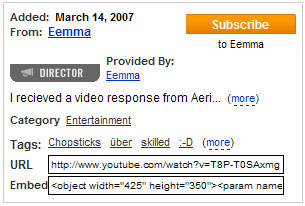
Firstly, go to Youtube and open the page of the video you want to put on your iPod. And you will find the Youtube URL of this video to the right of the playback window. Then copy this URL. See the highlighted area in the figure below:

put Limewire music, YouTube video on iPod

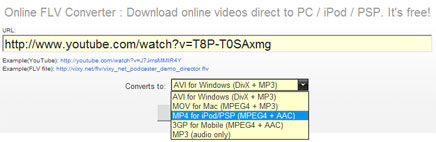
Secondly, go to http://vixy.net/ , paste the copied URL into the URL field of this web page, and select "MP4 for iPod/PSP" from the "Converts to" drop-down list. Then click "Start" below this list to start the conversion. See the highlighted areas below:

put Limewire music, YouTube video on iPod

Finally, after the conversion, this website will provide a download link for you to download the converted MP4 file. When you see the link, you can just download the final file from the link, save the downloaded MP4 file on your computer and use iTunes to sync it on to your iPod.

Recommended Products For you:
DVD to iPod Converter for Mac
It's a specially designed iPod conversion program to Convert DVD to iPod touch, iPod classic, iPod nano, convert DVD to iTunes on Leopard.
DVD to iPod Converter for Windows
It is one of the best conversion programs for PC that can put DVD on iPod touch, iPod classic, iPod nano and so on.

2010年11月8日星期一

Here’s a Better Name for RockMelt: The FaceBrowser

At the end of this video interview with BoomTown about RockMelt–a new social browser that debuted in beta last night via yet another broken news embargo (thus, I have just joined the army of TechCrunch’s Michael Arrington on this irksome issue)–the two founders politely tried to gloss over my calling it a “Facebook browser.”

Except, um, it is.

Sure, as Eric Vishria and Tim Howes correctly note, there are Twitter and other news apps present. And I even like the mantra for RockMelt, which “re-imagines the browser around friends, feeds, and sharing.”

But that would be–for the most part right now–friends on Facebook, feeds from Facebook and sharing with Facebook.

In fact, the whole shebang is essentially–as you can see from the screenshots below–a big wet kiss to Facebook.

Still, RockMelt certainly could cause a bang, since it is funded by Marc Andreessen, via his venture firm Andreessen Horowitz–along with a passel of Silicon Valley luminaries such as longtime exec and mentor to the tech stars, Bill Campbell.

Andreessen, of course, is the legendary entrepreneur who invented the browser and founded the first commercial Internet company–Netscape–16 years ago. (He is also, coincidentally or not, on the board of Facebook.)

Still, with all its pluses, the Mountain View, Calif.-based RockMelt could have a hard time breaking through the crowded browser software market to reach consumers.

Microsoft now dominates the market with its Internet Explorer, followed by other big players, such as Google’s Chrome, Apple’s Safari and Mozilla’s Firefox.

While not the first browser focused on social networking–that would be Flock, which is still around–RockMelt is trying to distinguish itself using these now-popular and innovative services.

You sign on to it using Facebook, natch, and the friends you choose are arrayed down one side vertically, while news and other apps are on the other.

It’s built on Google’s Chromium open source technology, which makes RockMelt a truly Silicon Valley creation.

2010年11月7日星期日

Motorola: More Devices, Screens Coming To A Home Near You (FASTech)

Motorola Inc. sees a future where there are more mobile devices, more screens to watch and more opportunities than in the past to help consumers navigate a roiling sea of content.

Geoff Roman, chief technology officer of Motorola Inc.’s Mobile Devices and Home Business division, said at the VentureWire FASTech conference on Wednesday that tomorrow’s consumers will have video coming at them from a variety of sources, including cable providers, satellite companies, Internet providers, smartphones, tablet computers and devices that have not been invented yet.

Motorola aims to have a handle on all the various “pipes” through which video and other content reaches users, he said.

“The poor consumer will have a difficult navigation task,” he said. “What is on what pipe, and how do I get it? The opportunity is for someone to be that integrator, who brings together the access in a seamless, user-friendly way.”

The home will become a place of multiple devices used by each family member, Roman said, envisioning a 50” television screen in the home of the future but everyone having their own smaller screen, featuring content that complements what they’re watching on the big screen or different content altogether.

Read the rest of this post on the original site

BlackBerry Ousted In Dell Owner Move-In Eviction

Now that Dell’s making smartphones, it figures its employees are better off using them than the BlackBerrys they’ve carried with them for so many years. And so the company is migrating some 25,000 BlackBerry users to its forthcoming Windows Phone 7 device, the Dell Venue Pro–a move, it says, that will reduce its mobile communication costs by a quarter.

So Dell’s eating its own dog food–a wise move, even without the cost savings. But what’s it going to do with 25,000 used BlackBerrys? The company’s not quite sure yet, but it’s got an idea or two. Said Dell CFO Brian Gladden, “We actually had a conversation last night around creating a site on eBay where we can actually sell these BlackBerry devices.”

If that’s truly the plan, Dell best get to work on that site while the used corporate BlackBerry market is still nascent–because a few other big companies are reportedly considering ditching the BlackBerry as well. Bank of America and Citigroup are both believed to be considering allowing their employees to use Apple’s iPhone or handsets running Google’s Android OS as an alternative to the BlackBerry–and between the two of them they have well over half a million employees.

2010年11月4日星期四

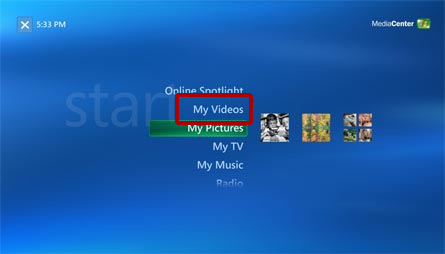
How to play Videos on Xbox 360

There are two ways you can watch videos on your Xbox 360:

Watch Video on Xbox 360

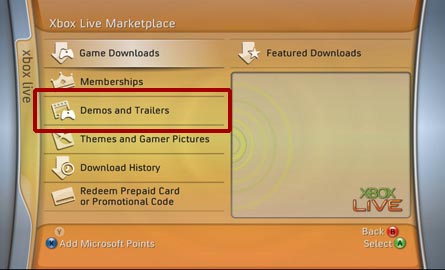
1. Download video from the Xbox Live Marketplace. Some of these videos are available for free while you may have to pay for others. Microsoft is in control of what videos are available through the Xbox Live Marketplace.

Download Xbox 360 video

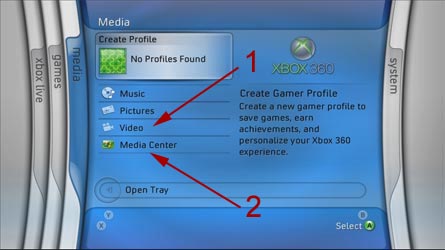
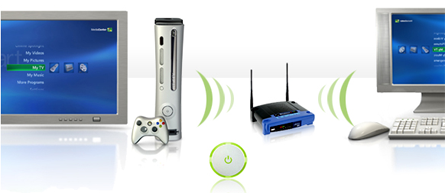
2. Stream videos from your Windows Media Center PC by using your Xbox 360 as a Media Center Extender. You are in control of what videos you want to watch, however there are restrictions on what kind of video you can playback. See below for more details.

Watch Xbox 360 video

Is there any way I can play my own videos WITHOUT a Media Center PC?.
No. Without a Windows XP Media Center PC, you can only play back the movies Microsoft offers in the Xbox Live Marketplace.

Do I need additional hardware/software to playback video on my Xbox 360?
Yes. You will either need the optional Xbox 360 Hard Drive to download/watch video from the Xbox Live Marketplace or you will need a PC with Microsoft Windows XP Media Center as your OS in order to stream video from your PC.

Transfer video to Xbox 360

Does it support video streaming through Windows Media Connect?
No. There are video sharing capabilities built into Windows Media Connect, however, Microsoft has chosen to ONLY allow you to share Audio and Pictures through Windows Media Connect. You CANNOT stream videos through Windows Media Connect to your Xbox 360.

stream videos to Xbox 360

What kind of videos can I play using the Media Center Extender?

Microsoft Windows Media Video (WMV) 7, 8, & 9
- Maximum resolution of 1920x1080 (1080p) at 30 frames per second.
- Windows Media Audio Standard or Windows Media Audio Pro audio.
- WMV content may be Windows Media DRM-protected.
- Bitrates up to 8 Mbps.
WMV Image 1 & 2
- Maximum resolution of 800x600
MPEG-1
- MPEG-1 layer I and II audio.
MPEG-2, DVR-MS
- Maximum resolution of 1920x1080 (1080i).
- MPEG-1 layer I and II or AC-3 audio.
- Bitrates up to 19.2 Mbps.

Does it support avi? Divx? Xvid? Quicktime? H264?

No. The Media Center Extender in the Xbox 360 only supports playback of DVR-MS, MPEG-1, MPEG-2 and WMV video.

How can I watch these other (avi, divx, xvid, etc) videos on my Xbox 360?
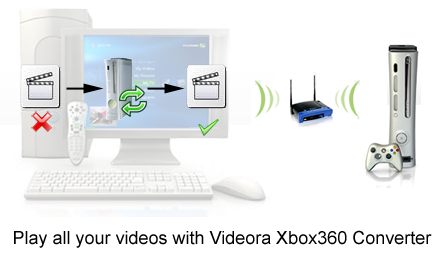
You have to convert these videos into the video formats the Xbox 360 Media Center Extender can playback. We recommend you to use Aiseesoft Total Video Converter (for Mac OS, choose video converter for Mac ) to convert all popular video formats to xbox 360 video and audio files perfectly with just a few clicks.

Play video on Xbox 360

Does the Xbox 360 support direct video streaming through Windows Sharing/Samba Shares?

No.

Can I watch DVDs through the Media Center Extender?
No, you can only watch DVDs by using the Xbox360's DVD drive.

Can I use a DVD Disc Changer through the Media Center Extender?
No. This functionality is not available in through the Xbox 360's Media Center Extender. You can only watch one DVD at a time by using the Xbox360's DVD drive.

Will My DVDs be available on the XBox 360?
"No. We did not implement the ability to remotely play back a DVD from a MCE to an XBox 360 Extender so it did not make sense to make My DVDs available. I certainly understand how cool it would be if you could put your MCE and full loaded DVD changer in a closest and use XBox 360's to watch your DVD collection from any room wirelessly but this is something that's going to have to wait until a future release." - Matt Goyer - MCE Program Manager

Can the Xbox 360 play video off the Xbox 360 Hard Drive?

Yes, but only video downloaded from the Xbox Live Marketplace or preloaded on the Xbox, not your own videos.
Can you hook up an external hard drive to the Xbox 360 and play videos off that?
No.

Recommended Products for you:
DVD to iPod Converter for Mac
It's a specially designed iPod conversion program to Convert DVD to iPod touch, iPod classic, iPod nano, convert DVD to iTunes on Leopard.
iPod Video Converter for Mac
It can convert MP4, MOV, 3GP, AVI, RM, MPEG, and FLV to iPod video with high output quality and various features.

2010年11月2日星期二

How to share the iTunes Music and videos between two computers for free

Some people may meet that situation: You and your brother both have iTunes library under the same credit card account. Occasionally, you want to get the same song, however you wouldn't want you both to pay the $0.99 where virtually the same account is purchasing the song twice. So how can you and/or he download the songs from each other once it's purchased on a single computer? This is a guide to tell you how to share iTunes Music and videos between two computers such as sharing iTunes Music and videos between Windows PC and Mac OS X, sharing iTunes Music and videos between Mac OS and Mac OS X and sharing iTunes Music and videos between Windows PC and Windows PC

Step 1, Networking computers.
If you want to share iTunes videos and music between computers, you need to network PC and Mac first.
If you do not know how to Network Windows with Mac OS X, go there:
Networking Windows (2000/XP/2003*) with Mac OS X (10.3/10.4)
Information you will need to know
1.The IP Address of your PC (Start > Run > CMD {return} > "ipconfig" {return})
2The IP Address of your Mac (Applications > Utilities > Terminal {Run app} > for ethernet connection "ipconfig getifaddr en0" {return} or for wireless "ipconfig getifaddr en1" {return})>
3.The workgroup the PC is in (Right click on My Computer, select Properties, and select the Computer Name tab)

System Configuration
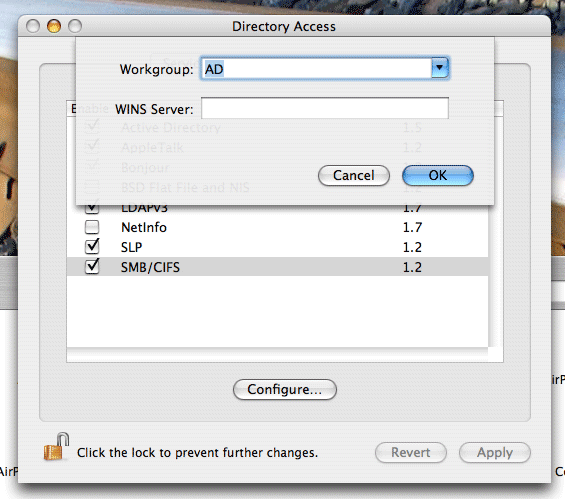
It is important that the account you log in with on your XP system has a password set, if it does not you will not be able to login to your Windows share from OS X. You need to put your Mac in the same workgroup as your Windows PC. To do this open "Directory Access" (Applications > Utilities > Directory Access). Click on the padlock in the bottom left corner to make changes; you will be prompted for your password. If "SMB" is not ticked off, then tick it off. Select "SMB" and hit the "Configure…" button. Now enter the name of your Windows workgroup. In my case the name is "AD".

Share iTunes videos between pc and Mac, iTunes videos from pc to Mac

Setting up the PC to share files
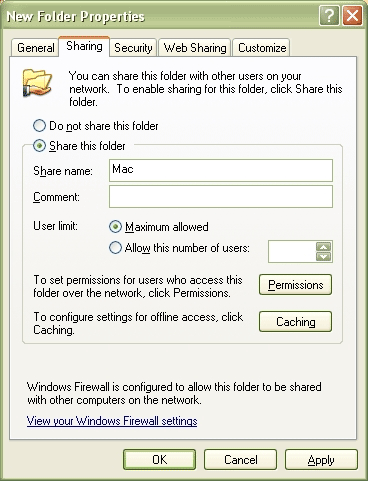
You need to create and share a folder on your PC that you will then access from your Mac. To do this create a folder (or select and existing one) right click on it from Windows Explorer and select "Properties". Select the "Sharing" tab and share out the folder. I'd recommend you use a one word name for the share. For example "Mac", not "Apple Mac Share", it just narrows the risk of complications.

Share iTunes videos between pc and Mac, iPod videos from pc to Mac

Setting up the Mac to share files
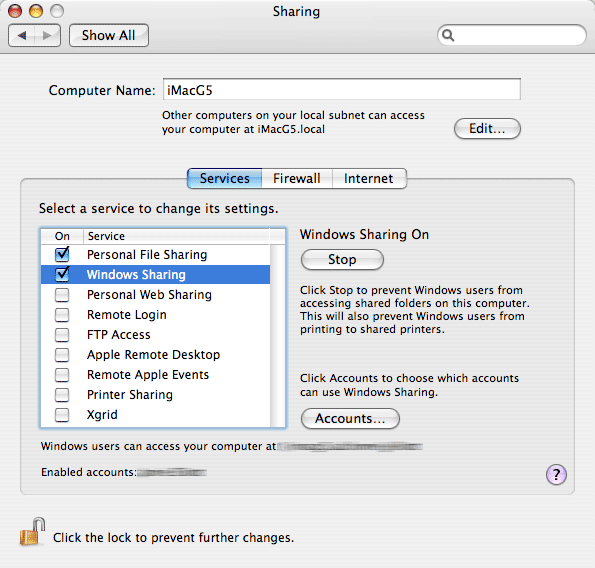
Open "System Preferences" (Applications > System Preferences). Go to "Sharing" under "Internet & Network", and tick off "Windows Sharing", and if it doesn't start by itself, click "Start". This will share out your entire home folder.

iTunes videos from pc to Mac

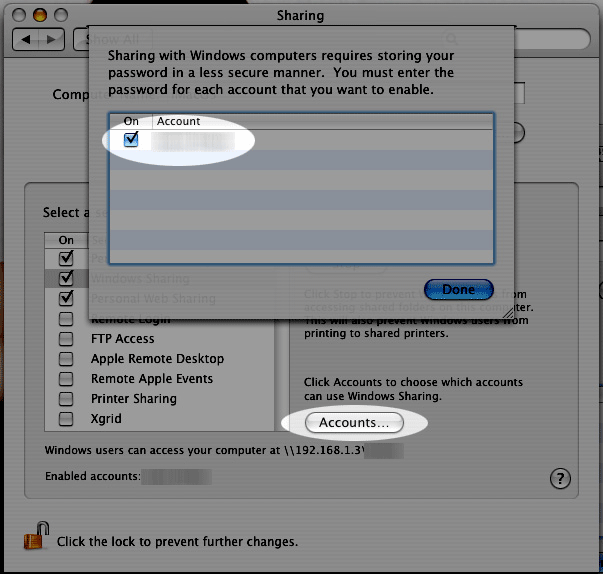
If You're running Tiger (10.4), you will also need to click the "Accounts" button and tick off the box next to your account name so that OS X knows to share out your particular home folder.

iTunes videos from pc to Mac

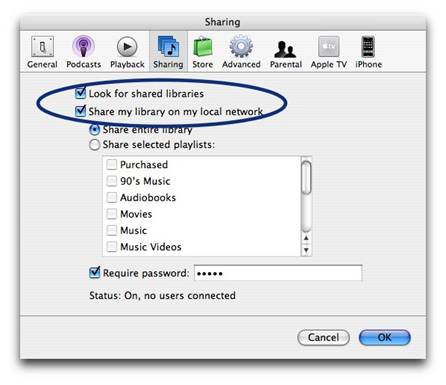
Step2, Go to preferences, under the sharing tab, enable "Share library..." and "Look for shared libraries..." on both computers.
Select the items you want to share.share iTunes videos and music for free

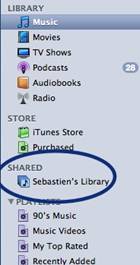
It will show up in iTunes' side panel:
share iTunes videos and music for free

To require users to enter a password before they can see your shared items, select "Require password" and enter a password.
You will need to authorize both computers to play purchased content however. You may authorize up to 5 Machines per iTunes Music Store account.
Tips:If you want to share music with other users on your computer ,read this article: iTunes: How to share music between different accounts on a single computer

2010年11月1日星期一

How to Rip DVD, Convert Video to iPhone, backup iPhone info, make iPhone Ringone For Windows/Mac

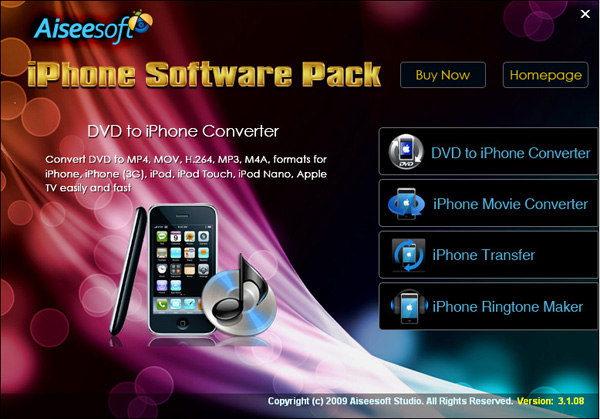
Recently, iPhone has became a really important part of our life. People use it to make a phone call, enjoy music and movies/videos, and play games. Today I will share you a really nice software pack, which can convert DVD and video to iPhone video/audio formats, backup iPhone info on your computer, and make iPhone ringtone easily.

What you need is just this nice Convert DVD Video to iPhone software

iPhone Software Pack

Part 1: How to convert DVD movies to iPhone
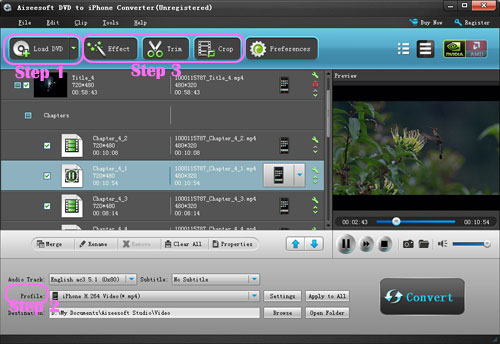
Use Aiseesoft DVD to iPhone Converter.

DVD to iPhone Converter

Step 1: Load DVD
Put your DVD in your DVD Drive and click “Load DVD” button

Step 2: Choose output profile and Settings
You can choose your output profile in the drop-list when you click profile list.
You can also adjust your settings, such as Resolution, Bitrate, so on.

Step 3: Edit Video
You can do “Trim”, “Crop”, “Merge into one file”and other video editing functions to make your video more enjoyable.

Click “Start” to begin you conversion. After few mins you can enjoy your DVD movies on your iPhone.

Part 2: How to convert videos to iPhone with iPhone Movie Converter

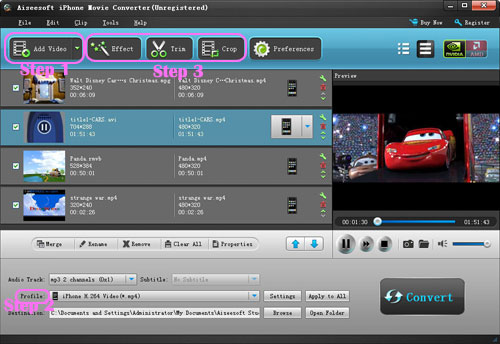
iPhone Movie Converter

Step 1: Add file
Click “Add File” button to add your video you want to put on your iPhone.

Step 2: Choose output profile and settings
You can choose your output profile in the drop-list when you click profile list.
You can also adjust your settings, such as Resolution, Bitrate and Encoder and so on.

Step 3: Edit Video
You can do “Trim”, “Crop”, “Merge into one file”and other video editing functions to make your video more enjoyable.

Click “Start” to begin you conversion. After few mins you can enjoy your videos on your iPhone.

Part 3: How to transfer songs and vdieos from iPhone to computer, from computer to iPhone and from iPhone to iPhone.

iPhone Transfer

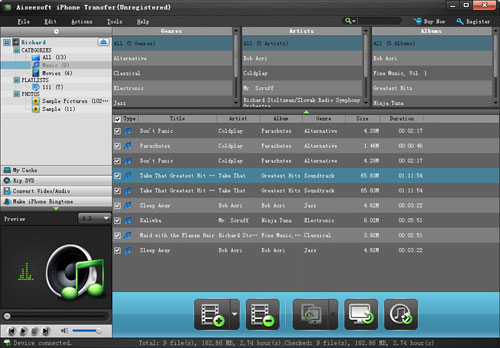
Step 1: Click iPhone Transfer
Click “Computer to iPhone”(1) button, it will allow you to transfer songs and videos from your computer to iPhone easily.
Click “iPhone to Computer”(2) button, it will allow you to backup your songs and videos from iPhone to your computer.
Click “iPhone to iPhone”(3) button, it will allow you to transfer songs and videos from one iPhone to another iPhone dirrectly.

Part 4: How to make your own iPhone ringtone

iPhone Ringtone Maker

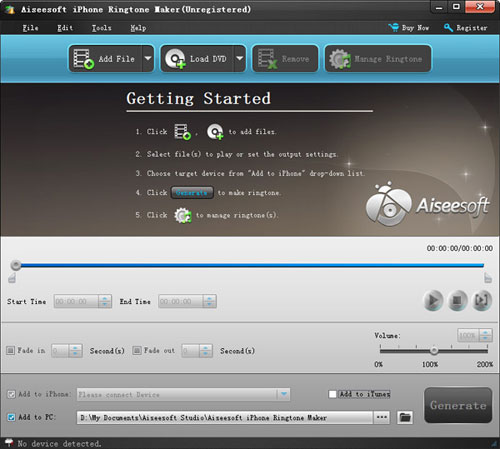
Step 1: Click iPhone Rigntone Maker and click “Browse” on the right side of "Input File" to import the file that you want to make ringtone from i.t

Step 2: Play it and listen the music to find the segment that you want to use it as ringtone. Then drag and click the start& end slider to set your wanted segment, or type the start & end time in the corresponding text box directly to get the exact segment. You also can pre-listen the converted audio before generate.

Step 3: Click “Browse” on the right side of "Local Output Folder" to choose the output destination.

Step 4: Check "Export to iPhone" option, the converted ringtone will be load to your iPhone directly.

Step 5: After all the settings are finished, click “Generate” to begin making your own iPhone ringtone.

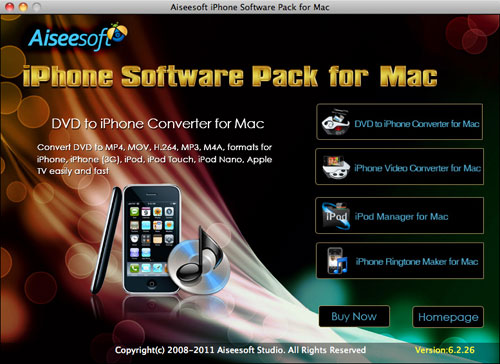
For Mac users I recommend you Aiseesoft iPhone Software Pack for Mac

Using Aiseesoft iPhone Software Pack for Mac, you can convert any video/DVD to iPhone Mac, backup the audio, video files on iPod to Mac and import audio, video files or folders from Mac to your iPod without iTunes with the help of iPod Manager Mac, even make iPhone ringtone from AVI, MPEG, WMV, MP4, FLV, MKV, H.264/MPEG-4, DivX, XviD, MOV, RM, RMVB, MP3, WMA, AAC video and audio sources on Mac.

iPhone Software Pack for Mac

Why Twitter’s C.E.O. Demoted Himself

At the annual South by Southwest gathering of techies in Austin, Tex., in March, conference organizers had chosen a hangar-size room to accommodate their star speaker: Evan Williams, the co-founder of Twitter, the messaging and social networking site that had become a digital phenomenon.

In a private moment before the doors opened, Mr. Williams, who is famously deliberate and cautious, snapped a photograph of the endless rows of chairs facing the stage and posted it on Twitter.

Read the rest of this post on the original site