This Guide will show you how rip your DVD with Aiseesoft DVD to iphone converter in an easiest way and explain how to split/join/subtitle/crop/trim the video files when converting.
Aiseesoft DVD to iPhone converter helps you rip DVD and convert DVD to iPhone MP4, M4V video (MPEG-4) H.264, and rip DVD audio to iPhone MP3 and M4A audio formats, all process will be accomplished with high quality and super fast conversion speed.
Here is a step by step guide of Aiseesoft DVD to iPhone converter to give you tips and hope helpful for you!
The whole Guide is divided into THREE parts, here we go:
Part one: How to convert DVD to iphone video in an easiest and common way.
Download Aiseesoft DVD to iPhone converter, install and start it.
Add your DVD into your DVD-Rom, or click the “Add…” button to open your DVD file, and add the DVD you want, you can also click the drop-down menu of 'Add…' button to add files, and you also can click “Load IFO File” to add files.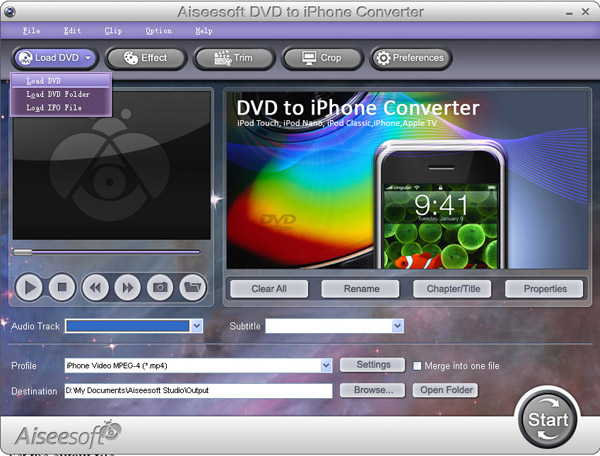
Set the output file
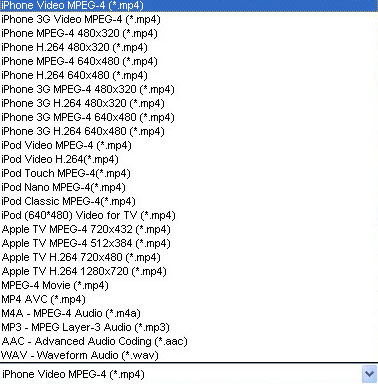
After you add video files, you can select an output format for each video file and find the destination folder on your computer for saving the output files.
-- Click the “Profile” drop-down menu to select the output format you need to convert;
---Click the “Open Folder” button to find the destination folder for saving output format;
If you want to convert DVD by default settings, just click “Start” button to begin the conversion. It is the easiest and common way to convert only needing 3 simple steps.
Note: You can click “settings” button to open the settings’ window and set the video parameters (such as resolution, frame bite, encoder, and bit rate) or audio parameters (such as sample rate, channel, encoder and bit rate, etc)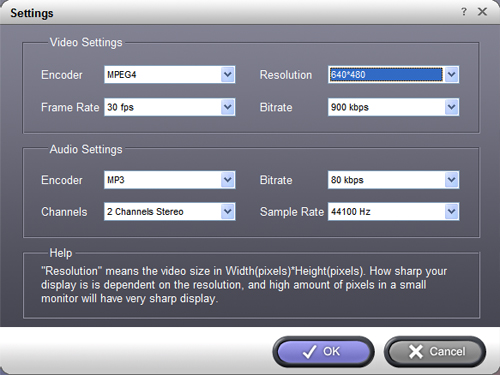
Part Two: Powerful editing function let you improve the quality of output files
Crop – Click the “Crop” button, in order to cut off the black edges of your DVD movie and let you enjoy it in full screen.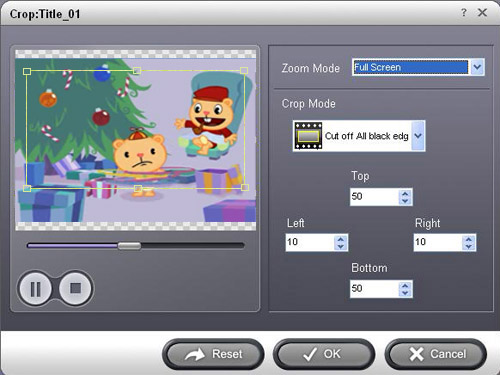
Tips: Move your mouse cursor to a box on the frame around the video, and drag the frame to crop your video. Or you can choose a crop option from 'No Crop, Cut off top and bottom black edges, Cut off top black edge, Cut off bottom black edge, Cut off left and right black edges and Cut off all black edges'.
Next part: Tips about using Aiseesoft DVD to iPhone Converter to convert DVD movie to iPhone?
Free Trial: Download Aiseesoft DVD to iPhone Converter

没有评论:
发表评论