Aiseesoft DVD to MP4 Converter for Mac is a powerful MP4 Converter for Mac OS X users. It can convert DVD to MP4 files and extract audio from DVD that can be played on iPhone, iPod, Apple TV, PSP and so on,. It supports various settings, such as selecting DVD subtitle and audio track, choosing any chapters or titles to convert, trimming DVD title or chapter, setting video brightness, contrast, saturation, and even converting all selected DVD titles or chapters into one file.
Note: This guide is for Mac users, If you use windows, Please see How to convert dvd to mp4 files on windows PC !
You can download the latest version for free form the product page of DVD to MP4 Converter for Mac, (choose intel version OR PowerPC version according to the processor of your iMac / MacBook / Mac Pro...)
Reference of Aiseesoft DVD to MP4 converter for Mac:
Source: DVD-Video, DVD IFO file, DVD folder.
Output Video formats: MP4, AVI.
Output Audio formats: M4A.
Support Devices: iPod touch, iPod nano, iPod classic, iPhone, Apple TV, Zune, PSP, PS3, Cell Phone, Creative Zen, iRiver, PMP, Archos, MP4 player and MP3 player.
Launch the program. You will find that this powerful Mac DVD to mp4 converter has a very cool and pretty friendly interface. All the buttons which you may use can be found easily, It is designed for the common, so it is easy to use. To advanced users, it is as easy as a piece of cake. Now let's start the conversion from DVD to MP4 by following this step by step guide:
Step 1: Add DVD Movie
Click the Load DVD button, browse your computer, find the DVD folder of the movie you want to add from your hard disc or DVD-ROM, open your DVD folder, select the VIDEO_TS folder and click OK.
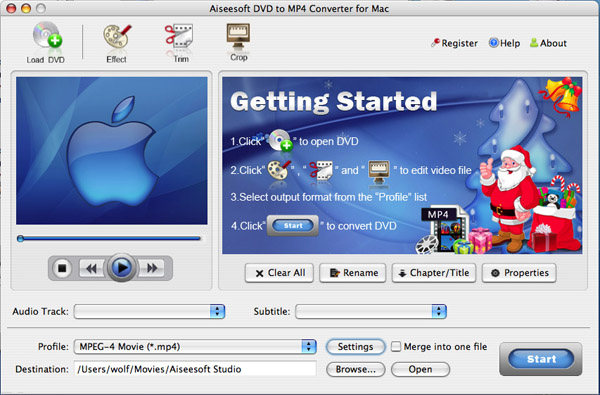
Here you may ask: I just favor one part of DVD not the entire DVD, and hope to save it into your portable player in order that to watch it anytime and anywhere, how can I do that? It is easy, after you add your movie, you can choose any titles or chapters that you want to convert by ticking the check boxes before them.
Step 2: Output Settings
MP4 is a new container format which allows you to combine different multimedia streams into one single file. Multimedia containers are for example the well known AVI, MPEG , Matroska, OGM. MP4 is the global file extension for the official container format defined in the MPEG-4 standard.
At the bottom of the main window, you can name the output file for the current title/chapter, and select a subtitle to put on your movie, select an audio track. Then finish all the settings including selecting an output format, clicking the Settings button to set the video and audio encoding settings, choose if to merge the selected titles or chapters into one file, and set an output directory to save the output files.
If you don't know much about the details of mp4 format, you can select a format according to the name of your portable player. For example, you can select 'PSP Video MPEG-4(*.mp4)' when you want to rip DVD to PSP on Mac, and the default setting works great.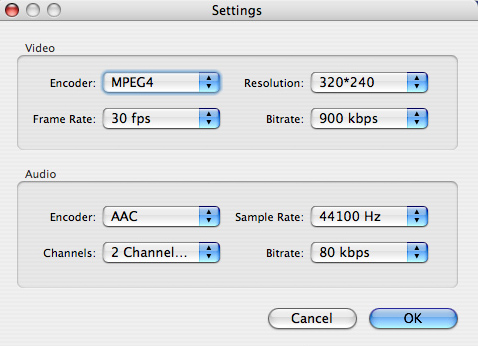
Step 3: Start Conversion
After setting the output settings, you can just click the “Start” button to start converting your Movie. You can choose to shut down your computer or open the output folder after the conversion so you don't have to sit before your computer waiting for the conversion to finish.
Aiseesoft DVD to MP4 Converter for mac can also trim, crop videos and capture pictures, these functions are the same as DVD Ripper for MAC. You can learn more from how to edit, crop, trim DVD clips on Mac OS X .
Buy Now (only $29.00) Download Intel Version Download PowerPC Version

没有评论:
发表评论